How it works
Three moves to learn. That’s it.
Point at the top
Rest the pointer at the top of the screen, or press ⌃⌥⌘H. Your notes swing down. Move away and they tuck back up.
Click to write
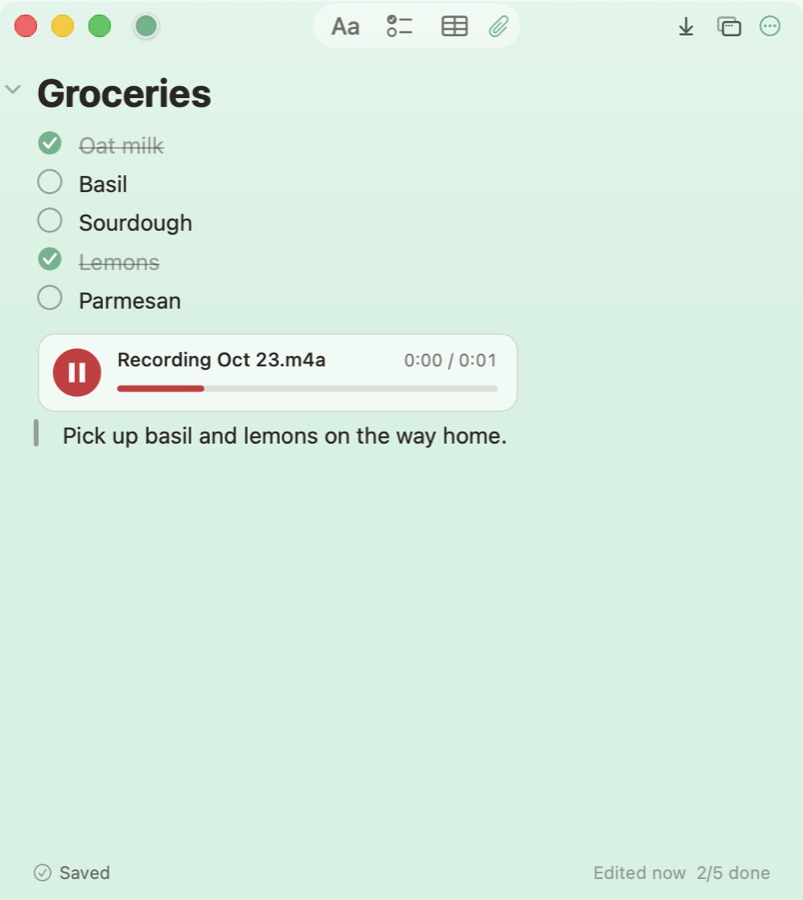
Every note opens in a full editor with checklists, tables, pictures and recordings. It saves as you type.
Drag down to float
Pull a note off the rope and it floats on your desktop, on top of other windows if you like. Hang it back with one click.
A real notes app
Everything you’d expect, nothing you have to set up.
- Write the way you think. Titles, headings, checklists, bullets, quotes, tables and collapsible sections.
- Add anything. Images, files, sketches and audio recordings, transcribed on your Mac.
- Stay organised. Folders, #tags, pins, search, gallery view and Recently Deleted.
- Keep the rope tidy. Only everyday notes hang. Take the rest off the rope and they wait in the Notes Manager.
Private by design
Your notes never leave your Mac unless you send them.
No account. No network.
Hanging Notes doesn’t connect to the internet at all. There’s no sign-up, analytics or tracking.
Lock what’s personal
Lock a note with a password or Touch ID. Locked notes are encrypted with AES-256 and lock again when your Mac sleeps.
Backups you control
Daily backups on your Mac, plus optional encrypted backups to iCloud Drive or Google Drive: daily, weekly or monthly.
Works with AI assistants
Ask your assistant. The note appears on your rope.
Connect Claude, ChatGPT, Cursor or any assistant that supports MCP in one click. Assistants can add notes and tick items. Reading your notes stays off until you allow it, and locked notes are never shared.
AI Inbox too.Bring your notes
Move in an afternoon.
Imports copy your notes in and never change the originals. Run one again and it skips what’s already here.
Keyboard first
Shortcuts that work from any app.
Get Hanging Notes
Pay once. Keep it forever.
One purchase on the Mac App Store, with free updates and no subscription. Install it on every Mac you sign in to with your Apple ID.
Mac App Store
One click to install. Updates arrive by themselves, and it runs safely in Apple’s App Sandbox.
Download on theMac App StoreSoonWhat’s included
- The rope, floating notes and the full editor
- Locked notes with Touch ID
- Encrypted backups to iCloud Drive or a folder you choose
- Imports from Apple Notes, Stickies and files
- Shortcuts, Siri and AI assistants
Requires macOS 14 Sonoma or later. Universal: runs natively on Apple silicon and Intel Macs.
Questions
Good to know
Where are my notes stored?
On your Mac, in a local database. Nothing is uploaded unless you turn on cloud backup, which saves encrypted backup files to iCloud Drive or a folder you choose.
Does the rope get in the way?
No. It only appears when you point at the top of the screen or press the shortcut, and it never takes keyboard focus from the app you’re in. On Macs with a notch it keeps clear of the camera.
Can I keep some notes off the rope?
Yes. Take any note off the rope and it stays in the Notes Manager and its folder. Hang it back whenever you need it in view.
Does it sync to my iPhone?
Not yet. Hanging Notes is a Mac app and keeps your notes on your Mac. Encrypted cloud backups protect them if something happens to your Mac.
Is it a subscription?
No. You pay once and every update to Hanging Notes is free. Your purchase works on all your Macs signed in with the same Apple ID.